0 ratings


vare #:
220515945
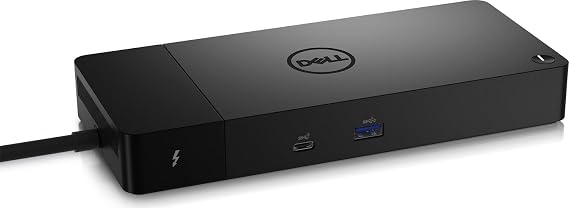
Dell ThunderBolt 4 Dock (WD22TB4), Black
75% av respondentene vil anbefale dette til en venn
vare #:
220515945
NOK 2362
Prisdetaljer
Eksklusive frakt- og tollkostnader ( Frakt- og tollkostnader beregnes ved kassen )
*Alle varer importeres fra USA
0 ratings
Skriv en vurdering
På lager
 Importert fra USA-butikk
Antall:
Bestill nå, så får du den omkring Lørdag, September 26
Sikker transaksjon
Ubuy arbeider hardt for å beskytte din sikkerhet og personvern. Vårt avanserte betalingssikkerhetssystem sikrer konfidensialitet ved å kryptere informasjonen din under overføring ved hjelp av AES (Advanced Encryption Standards) og SSL (Secure Socket Layer)-protokoller. Betalingsopplysningene dine er 100 % sikre da vi ikke deler betalingsopplysningene dine med tredjepartsselgere.
Våre beste leveringspartnere


Multiply Productivity: Connect displays and peripherals to your system with a single cable for ultimate productivity.

Fast
Shipping

Gratis
retur*

Sikret innpakking

100 % originale produkter

PCI DSS-samsvar

ISO 27001-sertifisert



Note: Step Down Voltage Transformer required for using electronics products of USA store (110-120). Recommended power converters Kjøp nå.


Det som utmerker seg
Versatile Connectivity
The Dell ThunderBolt 4 Dock WD22TB4 offers multiple ports including USB-C, USB-A, HDMI, and Ethernet, ensuring seamless connectivity to a variety of devices for home or office use.
High-Speed Data Transfer
With Thunderbolt 4 technology, this dock enables data transfer speeds of up to 40 Gbps, allowing users to quickly transfer large files and enhance productivity without lag.
Dual 4K Display Support
Supports dual 4K displays, enabling an expansive workspace for multitasking and improved efficiency, making it ideal for graphic designers, video editors, and professionals needing high-resolution output.
Produkt detaljer
| Package Weight | 4.34 Pound |
Hvem passer produktet for?

-
Remote Workers
Ideal for remote workers needing multiple connectivity options for laptops, enhancing productivity and workspace organization.
-
Content Creators
Great for video editors and graphic designers requiring high data transfer speeds and multiple display support.
-
Gamers
Designed for gamers using laptops, offering fast data transfer and multiple peripherals support for an enhanced gaming experience.

-
Casual Users
Not suitable for casual users needing only basic connectivity, as features may be excessive for their requirements.
PRODUKTBESKRIVELSE
Dell ThunderBolt 4 Dock (WD22TB4), Black
Har du noen spørsmål? Chat med oss
Kundespørsmål og svar
-
Spørsmål:
Hvordan handle Dell ThunderBolt 4 Dock (WD22TB4), Black online fra Ubuy?
Svar: Det er enkelt å handle Dell ThunderBolt 4 Dock (WD22TB4), Black online fra Ubuy.. Du trenger bare å søke etter produktet, velge fraktmetode mens du sjekker ut og få det levert til ditt sted. -
Spørsmål:
Er Dell ThunderBolt 4 Dock (WD22TB4), Black tilgjengelig for nettbutikk i Norway?
Svar: Ja, hos Ubuy Norway er dette produktet tilgjengelig for deg å handle til en rimelig pris.. Dell ThunderBolt 4 Dock (WD22TB4), Black er ikke tilgjengelig lokalt, men du kan stole på oss med våre ekspressfrakttjenester. -
Spørsmål:
Hvor lang tid tar det å få produktet etter bestillingen?
Svar: Leveringstiden for det bestilte produktet ditt varierer i henhold til hva du har bestilt og fraktmetoden du har valgt.. Den estimerte leveringstiden er nevnt under utsjekkingsprosessen, så vær bekymringsløs mens du handler.
Dell Docking Stations Editorial Review
Dell ThunderBolt 4 Dock (WD22TB4), Black is tailored for Dell, HDMI, Thunderbolt, and USB C compatibility, making it an efficient connection hub for modern setups. Users have reported it functioning seamlessly with dual monitors and providing swift laptop charging. However, some buyers have raised concerns over connectivity issues with Ethernet and audio devices, which can often be resolved with a simple reboot while connected. The dock's limited USB-A ports may also frustrate users with multiple peripherals, necessitating additional adapters. Overall, this docking station is most effective within the Dell ecosystem, providing excellent performance when appropriately configured.
Kundeanmeldelser og vurderinger
1 kunders vurderinger
-
5 stjerne
100%
-
4 stjerne
0%
-
3 stjerne
0%
-
2 stjerne
0%
-
1 stjerne
0%
Vurder dette produktet
Del tankene dine med andre kunder
Fordeler
- Works well with dual monitor setups
- Fast charging capabilities
- Supports Thunderbolt 4 connections
- Compact design fits various spaces
- Reliable for Dell laptops
Ulemper
- Limited USB-A ports for multiple devices
Produktets prishistorikk
Viktig informasjon
- Begrensninger: For produkter som sendes internasjonalt, vær oppmerksom på at eventuell produsentgaranti kan være ugyldig; produsentens serviceordninger er kanskje ikke tilgjengelige; produktmanualer, instruksjoner og sikkerhetsadvarsler er kanskje ikke på mottakerlandets språk; produktene (og medfølgende materiell) er kanskje ikke utformet i samsvar med mottakerlandets standarder, spesifikasjoner og merkekrav; og produktene samsvarer kanskje ikke med mottakerlandets krav til spenning og andre elektriske standarder (noe som kan kreve bruk av adapter eller omformer om nødvendig). Mottakeren er ansvarlig for å sikre at produktet lovlig kan importeres til mottakerlandet. Ved bestilling fra Ubuy eller dets datterselskaper er mottakeren registrert importør og må overholde alle lover og forskrifter i mottakerlandet.
- Ikke alle produkter som er oppført på Ubuy er til salgs, da Ubuy er en global søkemotor. Produkter er underlagt eksport-/handelsreguleringer.
NOK 2362
Bestill nå, så får du den omkring Lørdag, September 26
Denne varen er ikke underlagt restriksjoner i mitt land. (Klikk på lenken over hvis varen ikke er begrenset i ditt land, så vil teamet vårt vurdere og godkjenne den.)
Antall:
Sikker transaksjon
PCI DSS-kompatibel og ISO 27001:2022-sertifisert, med krypterte betalinger og full kjøperbeskyttelse på hver bestilling.
Våre beste leveringspartnere
Raskeste grenseoverskridende levering
Funksjoner og fordeler
- Modular design for easy upgrades with swappable modules.
- Features 2 x Thunderbolt-4 ports for high connectivity.
- Fast charging technology with SuperBoost capabilities.
- Supports multiple 4K displays and Thunderbolt peripherals.
- Data transfer speeds up to 40 GB/s for maximum efficiency.
- Compatible with Windows 10 and Windows 11 systems.
Ubuy-garanti
Opplev bekymringsfri shopping med 100 % originale produkter, PCI DSS-kompatibel betalingssikkerhet, ISO 27001-sertifisert databeskyttelse, den raskeste grensekryssende leveringen, gratis retur, og sikker emballasje på hver bestilling.*