- Hjemmeside /
- Elektronikk /
- Computer Accessories /
- Computer Accessories & Peripherals /
- Audio & Video Accessories /
- Computer Speakers /
- PC Motherboard Internal Speaker 3-Pack, BIOS ...
0 ratings


vare #:
3440064
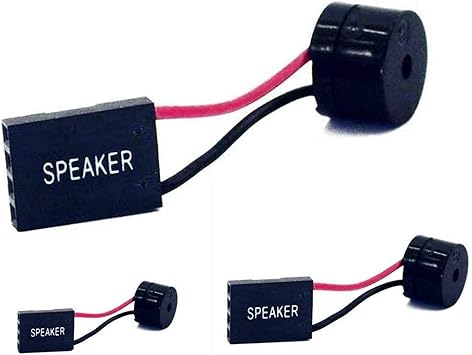
PC Motherboard Internal Speaker 3-Pack, BIOS Alarm Buzzer for PC Troubleshooting & Post Beep Code Diagnostics, Essential Mini Hardware Tool for DIY
vare #:
3440064
NOK 141
Price Details
Excluding Shipping & Custom charges ( Shipping and custom charges will be calculated on checkout )
*All items will import from US
0 ratings
Skriv en vurdering
På lager
 Importert fra USA-butikk
QTY:
Bestill nå og få den rundt Onsdag, Juni 24
Sikker transaksjon
Ubuy arbeider hardt for å beskytte din sikkerhet og personvern. Vårt avanserte betalingssikkerhetssystem sikrer konfidensialitet ved å kryptere informasjonen din under overføring ved hjelp av AES (Advanced Encryption Standards) og SSL (Secure Socket Layer)-protokoller. Betalingsopplysningene dine er 100 % sikre da vi ikke deler betalingsopplysningene dine med tredjepartsselgere.
Våre beste leveringspartnere


The internal PC motherboard speaker allows the user to hear post code beeps as it boots up to ensure everything is working correctly. With a 3-inch long cable and the ability to plug onto the Speaker header connection on the motherboard, this speaker reduces wiring clutter.

Fast
Shipping

Gratis
retur*

Sikret innpakking

100 % originale produkter

PCI DSS Compliance

ISO 27001 Certified


Note: Step Down Voltage Transformer required for using electronics products of US store (110-120). Recommended power converters Kjøp nå.


Hva skiller seg ut
Multi-Pack Value
This 3-pack of internal speakers provides excellent value, ensuring you have spare units for multiple builds or repairs, making it ideal for DIY enthusiasts and IT professionals.
BIOS Alarm Functionality
Designed to emit POST beep codes, these speakers aid in diagnosing motherboard issues quickly, helping users troubleshoot problems efficiently without requiring advanced tools or extensive knowledge.
Kompakt design
The mini hardware tool is easily installable in virtually any case, saving space while ensuring you're always equipped for computer building or repairs, perfect for technicians and hobbyists alike.
Produkt detaljer
- 3pcs pack of PC motherboard internal speakers
- Approximately 3 inch long cable to reduce PC wiring clutter
- Used to hear post code beeps and BIOS alarm sounds
- Plugs onto the Speaker header connection on the motherboard
- Enables monitoring of PC boot codes for system diagnostics
- Provides various beep codes for different errors and failures
| Pakkevekt | 1 pund |
Who Should Buy?

-
Computer Builders
Ideal for individuals assembling PCs, as it provides essential BIOS beep codes for troubleshooting hardware issues.
-
Teknologi entusiaster
Great for hobbyists who enjoy customizing systems and require alerts for various BIOS statuses during operation.
-
Repair Technicians
Beneficial for professionals diagnosing motherboard problems, using beep codes to efficiently identify faults and streamline repairs.

-
Average Users
Not essential for everyday users who do not troubleshoot hardware issues and primarily use pre-built systems.
-
Non-technical Individuals
Unsuitable for those unfamiliar with computer hardware who may not understand BIOS beep codes or their meanings.
-
Mobile Users
Not necessary for users of laptops or tablets, as these devices do not use internal BIOS alarm buzzers.
PRODUKTBESKRIVELSE
PC Motherboard Internal Speaker 3-Pack, BIOS Alarm Buzzer for PC Troubleshooting & Post Beep Code Diagnostics, Essential Mini Hardware Tool for DIY Computer Building & IT Repair
Har du noen spørsmål? Chat med oss
Spørsmål og svar for kunde
-
spørsmål:
What is a PC Motherboard Internal Speaker BIOS Alarm Buzzer used for?
svar: A PC Motherboard Internal Speaker BIOS Alarm Buzzer is primarily used to provide audio feedback during the boot-up sequence of a computer. This small device emits beeping sounds that can indicate various hardware issues, such as problems with RAM or graphics cards. When troubleshooting a system that fails to boot, these audible signals can aid you in pinpointing the issue effectively. For instance, if you hear a series of short beeps, it may suggest a memory error, helping you quickly address the problem. -
spørsmål:
How do I install the internal speaker buzzer on my motherboard?
svar: Installing a PC Motherboard Internal Speaker BIOS Alarm Buzzer is a straightforward process. First, ensure that your computer is powered off and unplugged. Locate the speaker header on your motherboard, which is often labeled as 'SPKR' or 'SPEAKER.' Align the pins of the buzzer with the header, ensuring proper orientation, then gently press down to secure it. This setup will allow the speaker to connect and function during boot-up, making it essential for effective troubleshooting. If you’re unsure of the orientation, your motherboard manual typically provides guidance. -
spørsmål:
Are all BIOS alarm buzzers compatible with every motherboard?
svar: No, not all BIOS alarm buzzers are universally compatible with every motherboard. Most motherboards have a specific type of connector, and it’s important to verify that the internal speaker buzzer you choose matches that configuration. Additionally, different motherboards may have different signaling protocols for audio alerts, so it’s advisable to check your motherboard’s specifications before purchasing. Ensuring compatibility will help avoid functionality issues, allowing for accurate beep codes during troubleshooting. -
spørsmål:
What types of beep codes can I expect from a BIOS alarm buzzer?
svar: A BIOS alarm buzzer can produce a range of beep codes, which are useful diagnostics for identifying hardware problems. For example, one long beep followed by two short beeps typically indicates a graphics card error, while a series of short beeps might pinpoint a memory fault. Familiarizing yourself with these beep codes can significantly streamline the troubleshooting process. Refer to your motherboard's manual for a detailed list of beep codes specific to your model, as this will provide guidance on how to resolve various issues. -
spørsmål:
Is a motherboard internal speaker necessary for troubleshooting?
svar: While not strictly necessary, a motherboard internal speaker significantly enhances the troubleshooting process. This device provides immediate auditory feedback on hardware status during the boot process, allowing you to quickly identify potential issues based on the beep codes emitted. In scenarios where a computer fails to display anything on the screen, the alarm buzzer serves as an essential diagnostic tool. By interpreting the beeps, users can swiftly determine whether they need to check their RAM, CPU, or other critical components. -
spørsmål:
Can I replace an old motherboard internal speaker with a new one?
svar: Yes, replacing an old motherboard internal speaker with a new one is quite feasible and often necessary if the original speaker is malfunctioning. To ensure proper function, simply follow the installation instructions: remove the old buzzer, and connect the new one to the same speaker header on the motherboard. This straightforward upgrade can restore your system's audio diagnostics, ensuring you receive accurate beep codes during boot. Make sure to select a compatible model for seamless integration into your setup. -
spørsmål:
How many internal speakers come in a standard PC motherboard buzzer pack?
svar: A standard PC Motherboard Internal Speaker BIOS Alarm Buzzer pack typically includes three individual speakers. This quantity is advantageous because it allows users to have spare units on hand for future use. In case one speaker fails or if you work with multiple systems, having additional buzzers can save time and enhance your troubleshooting capacity. It’s a practical choice for enthusiasts or professionals who often service different types of computers. -
spørsmål:
What are the dimensions of a standard motherboard internal speaker?
svar: The dimensions of a standard motherboard internal speaker typically range around 2 inches in length and width and about 0.5 inches in height. These compact measurements make it easy to fit within the confines of most computer cases and motherboard layouts. Since space can be limited in different setups, ensuring the size is appropriate is key. This compact design allows the internal speaker to be easily installed without interfering with other components, maintaining a clutter-free environment inside the computer case. -
spørsmål:
Can damage to internal speakers affect my computer's performance?
svar: Generally, damage to internal speakers does not directly affect the overall performance of your computer. However, without a functioning speaker, you will miss critical beep codes that indicate hardware faults during boot. This lack of feedback can hinder your ability to troubleshoot effectively. For instance, if your computer fails to start and the speaker is damaged, you may not know whether the issue lies with the RAM or GPU, leading to prolonged troubleshooting. Thus, while not performance-related, functional buzzers are essential for efficient diagnosis. -
spørsmål:
Where can I buy PC Motherboard Internal Speaker BIOS Alarm Buzzer 3pcsPack?
svar: You can buy the PC Motherboard Internal Speaker BIOS Alarm Buzzer 3pcsPack from Ubuy in Norway. Ubuy offers a broad selection of electronic components, allowing you to find what you need easily. Their platform is user-friendly, making it simple to locate specific products such as internal speaker buzzers. Whether you’re building a new PC or upgrading parts, Ubuy can provide the necessary components to ensure your system runs smoothly.
SoundOriginal Computer Speakers Editorial Review
The SoundOriginal PC Motherboard Internal Speaker BIOS Alarm Buzzer is a basic plugin tweeter or beeper. It beeps a code during the Power On testing procedure to let you know what is happening. It can be very helpful and resolves the issue you might have while troubleshooting motherboard booting issues. It does not have any range and bass response can be predicted to be negligible. It comes in packs of three and works great. However, it lacks nuance for choral works. Some motherboards might have beep codes for power issues so Consult your motherboard's manual to see what the codes are. Overall, it is a useful product for those who need to hear a motherboard post sounds.
Kundeanmeldelser og vurderinger
1 kunders vurderinger
-
5 stjerne
100%
-
4 stjerne
0%
-
3 stjerne
0%
-
2 stjerne
0%
-
1 stjerne
0%
Vurder dette produktet
Del tankene dine med andre kunder
Fordeler
- Shipped in better packaging than others
- Fungerer som annonsert
Ulemper
- Does not have any range
Produktets prishistorikk
Viktig informasjon
- Begrensninger: For produkter som fraktes internasjonalt, vennligst merk at eventuell produsentgaranti kanskje ikke er gjeldende; produsentens tjenestealternativer er kanskje ikke tilgjengelige; produktveiledninger, instrukser og sikkerhetsadvarsler er kanskje ikke tilgjengelig på destinasjonslandets språk; produktene (og medfølgende materiell) er kanskje ikke laget i samsvar med destinasjonslandets standarder, spesifikasjoner og krav om merking; og det kan være at produktene ikke har samme spenningsgrad og elektriske standard som destinasjonslandet eller ikke følger (det må brukes adapter eller strømomformer der dette gjelder). Mottakeren er ansvarlig for å forsikre seg om at produktet lovlig kan importeres til destinasjonslandet. Ved bestilling fra Ubuy eller deres partnere er mottakeren den registrerte importøren, og må etterleve alle lover og reguleringer i destinasjonslandet.
- Ikke alle produktene som er opplistet hos Ubuy er til salgs, siden Ubuy er en global søkemotor. Produkter er underlagt reguleringer for eksport og handel.
NOK 141
Bestill nå og få den rundt Onsdag, Juni 24
This item is not restrict in my country.(Please click on above link if this item is not restrict in your country, So our team will review and allow.)
QTY:
Sikker transaksjon
Ubuy arbeider hardt for å beskytte din sikkerhet og personvern. Vårt avanserte betalingssikkerhetssystem sikrer konfidensialitet ved å kryptere informasjonen din under overføring ved hjelp av AES (Advanced Encryption Standards) og SSL (Secure Socket Layer)-protokoller. Betalingsopplysningene dine er 100 % sikre da vi ikke deler betalingsopplysningene dine med tredjepartsselgere.
Våre beste leveringspartnere
Rask levering over grenser
Funksjoner og fordeler
- Internal PC motherboard speaker used to hear post code beeps
- 3-inch long cable reduces PC wiring clutter
- Plugs onto the Speaker header connection on the motherboard
- Allows user to ensure everything is working correctly during boot up
- Comes in a package of 3 motherboard speakers
- Compatible with BIOS alarm sound of POENIX