0 ratings


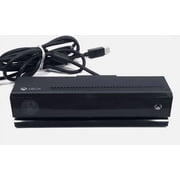
Utilize Kinect skeletal-tracking, sophisticated microphone array, and other sensor technologies to transform products, processes, and businesses. The Kinect for Windows sensor unit is intended to be used with the Kinect for Windows Commercial SDK and associated runtime software. You can run applications built with the Kinect for Windows Commercial SDK and build applications with C++, C#, or Visual Studio Basic by using Microsoft Visual Studio 2010.

vare #:
804458
Kinect for Windows
vare #:
804458
NOK 4075
Prisdetaljer
Excluding Shipping & Custom charges ( Shipping and custom charges will be calculated on checkout )
*All items will import from USA
0 ratings
Skriv en vurdering
På lager
 Importert fra USA-butikk
Bestill nå, så får du den omkring Onsdag, August 12
Sikker transaksjon
Ubuy arbeider hardt for å beskytte din sikkerhet og personvern. Vårt avanserte betalingssikkerhetssystem sikrer konfidensialitet ved å kryptere informasjonen din under overføring ved hjelp av AES (Advanced Encryption Standards) og SSL (Secure Socket Layer)-protokoller. Betalingsopplysningene dine er 100 % sikre da vi ikke deler betalingsopplysningene dine med tredjepartsselgere.
Våre beste leveringspartnere


Utilize Kinect skeletal-tracking, sophisticated microphone array, and other sensor technologies to transform products, processes, and businesses. The Kinect for Windows sensor unit is intended to be used with the Kinect for Windows Commercial SDK and associated runtime software. You can run applications built with the Kinect for Windows Commercial SDK and build applications with C++, C#, or Visual Studio Basic by using Microsoft Visual Studio 2010.

Fast
Shipping

Gratis
retur*

Sikret innpakking

100 % originale produkter

PCI DSS-samsvar

ISO 27001-sertifisert


Note: Step Down Voltage Transformer required for using electronics products of USA store (110-120). Recommended power converters Kjøp nå.


Det som utmerker seg
Motion Tracking
Kinect for Windows offers advanced motion tracking technology, enabling interactive applications and seamless user experiences for gaming, fitness, and educational platforms.
Voice Recognition
Equipped with sophisticated voice recognition, the Kinect allows for hands-free control, enhancing accessibility and user engagement in various software applications.
Developer Support
Kinect for Windows comes with robust developer tools and resources, empowering creators to build innovative applications that leverage cutting-edge sensor technology.
Produkt detaljer
| Kompatible enheter | PC, Windows |
| Kontrollertype | Motion Sensor |
| Tilkoblingsteknologi | USB |
| Ytterligere funksjoner | Motion Sensing, Motion Sensor |
| Knapptall | 14 |
| Hardware Platform | Windows |
| Strømkilde | Ledning elektrisk |
| Vekt av varen | 2,5 pund ( 1,13 kg ) |
| Pakkemengde | 1 |
| Vare dimensjoner | 15 x 6.1 x 4.8 inches (38.1 x 15.5 x 12.2 cm) |
| Farge | Svart |
| Merkenavn | Microsoft |
| Modellnavn | Kinect for Windows |
| Produsent | Microsoft |
| Global Trade Identifikasjonsnummer | 08853703717650 |
| UPC | 885370371765 763615910576 |
| Modellnummer | L6M-00001 |
| Produsentens delenummer | L6M-00001 |
| Merke | Microsoft |
Hvem passer produktet for?

-
Game Developers
Ideal for developing interactive motion-based games, leveraging Kinect's advanced motion tracking and sensory inputs.
-
Utdanningsinstitusjoner
Useful for interactive learning tools, enhancing classroom experiences through motion-based engagement and activities.
-
Fitness entusiaster
Great for fitness applications that utilize motion tracking to improve workout techniques and provide feedback.

-
Uformelle spillere
Users who prefer traditional controllers may find Kinect's motion controls less intuitive and harder to master.
PRODUKTBESKRIVELSE
Kinect for Windows
Har du noen spørsmål? Chat med oss
Relaterte søk
Spørsmål og svar fra kunder
-
Spørsmål:
What is Kinect for Windows and how does it work?
Svar: Kinect for Windows is an advanced motion sensing device that connects to Windows PCs to provide interactive experiences. It combines a camera, depth sensor, and microphone, allowing users to control applications using gestures and voice commands. This makes it ideal for gaming, but its applications extend to healthcare, education, and business. For instance, in healthcare, it can be used in rehabilitation programs to track patient movements. -
Spørsmål:
What are the system requirements for Kinect for Windows?
Svar: To use Kinect for Windows, you need a Windows PC with a USB 3.0 port, a compatible operating system (like Windows 8 or later), and a sufficient power supply. The device requires a dedicated processing unit, especially for more advanced applications that utilize its depth sensing capabilities. Ensure your PC meets these specifications to unlock the full potential of Kinect for Windows, such as developing immersive applications or enabling intuitive user interfaces. -
Spørsmål:
Can I use Kinect for Windows for gaming?
Svar: Yes, Kinect for Windows is designed to enhance gaming experiences by enabling motion and voice control. Games that support Kinect allow players to interact with virtual environments through gestures and voice commands, creating a more immersive experience. For instance, you can navigate menus, kick an on-screen soccer ball, or perform actions in a racing game using your body movements, making gaming more engaging and interactive. -
Spørsmål:
What applications can I develop with Kinect for Windows?
Svar: Kinect for Windows opens up a myriad of development possibilities, particularly for interactive applications. You can create games, educational tools, fitness programs, and even interactive art installations. Thanks to its SDK, developers can access features like skeleton tracking and gesture recognition, allowing for innovative applications. For example, educators can develop interactive learning tools that engage students through physical activity and participation. -
Spørsmål:
How does Kinect for Windows distinguish between users?
Svar: Kinect for Windows uses advanced skeletal tracking technology to recognize and differentiate between multiple users in its field of view. It can identify specific individuals based on their unique body characteristics and movements. This feature is particularly useful in multiplayer gaming environments or applications designed for multiple users, enabling personalized experiences where the software responds to each user's input. -
Spørsmål:
What are the key differences between Kinect for Windows and the original Kinect?
Svar: Kinect for Windows is specifically designed for PC integration, offering enhanced features and a more robust SDK for developers compared to the original Kinect, which was made primarily for consoles. The Windows version provides greater flexibility for developers to create customized applications and supports a wider range of environments, such as businesses and educational settings, making it a versatile tool beyond gaming. -
Spørsmål:
How can Kinect for Windows be used in educational settings?
Svar: Kinect for Windows can transform educational environments by making learning interactive and engaging. Teachers can develop applications that involve physical activity, helping students learn through movement. For example, a math app could have students physically represent geometric shapes or engage in problem-solving by moving around the classroom, making lessons dynamic and participatory. -
Spørsmål:
Is Kinect for Windows compatible with third-party applications?
Svar: Yes, Kinect for Windows can be used with various third-party applications designed to harness its capabilities. Developers can integrate Kinect's motion-sensing technology into their software to enable gesture control, voice activation, and enhanced user interaction. For example, some video conferencing tools leverage Kinect to allow users to control presentations or documents using their gestures. -
Spørsmål:
Where can I buy Kinect for Windows?
Svar: You can buy Kinect for Windows from Ubuy in Norway. Ubuy offers a reliable platform with a variety of options for purchasing electronic devices like Kinect. Shopping through Ubuy ensures you have access to product specifications, customer reviews, and detailed descriptions to inform your decision. -
Spørsmål:
What accessories are available for Kinect for Windows?
Svar: A variety of accessories enhances the Kinect for Windows experience, including tripods for stable placement, USB extenders for easier connectivity, and protective cases to safeguard the device. These accessories can help improve usability in different environments, such as classrooms or offices, where the sensor might need to be positioned at specific angles for optimal functionality.
Microsoft Accessories Editorial Review
The Kinect for Windows V1 is a popular system that is compatible with Windows 10 and can work with software such as Skanect and iClone animation software. However, users should note that they need to install and configure a separate SDK to get it to work. While the product is a bit old, it reportedly works well. On the other hand, there are complaints about missing components, adapters that don't work, and even possible fire hazards. Some customers also found it did not come with a US plug and the product was overpriced. There is a suggestion to buy the V2 instead because it has more programs and support.
Kundeanmeldelser og vurderinger
1 kunders vurderinger
-
5 stjerne
100%
-
4 stjerne
0%
-
3 stjerne
0%
-
2 stjerne
0%
-
1 stjerne
0%
Vurder dette produktet
Del tankene dine med andre kunder
Fordeler
- Compatible with Windows 10
- Compatible with Skanect and iClone software
- Works well according to some users
Ulemper
- Need to install separate SDK
Plattformtillit og kjøpstrygghet

MA
Mohammad
Verifisert kjøper
“Excellent quality and original too,when ubuy send original things I will appreciate that ,I very satisfied thank you”
23 July 2026 · via Trustpilot
CK
Chitra
Verifisert kjøper
“The order and delivery progress was communicated very well. Package arrived within the estimated time. Products arrived as expected in good condition.”
22-Jul-26 · via Trustpilot
K
kund
Verifisert kjøper
“Good supply of products. Safe payment methods, and shipment worldwide! Genuine products.”
23-Jul-26 · via Trustpilot
OO
Onesi
Verifisert kjøper
“Was my first time buying a product from Ubuy, but I found it so helpful. This is reliable. Gonna place a new order!”
22 July 2026 · via Trustpilot
SJ
SAO JOHN
Verifisert kjøper
“Ubuy is a great online platform to buy stuff. Reliable, fast delivery time and great value for money. I've been using Ubuy online shopping platform for three years now and will continue to do so.”
23 July 2026 · via Trustpilot
Sikker utsjekk
Global levering
Enkel retur
Originale produkter
Top selling Kinect Windows in NORGE



![Kinect Adapter for Xbox One S, Xbox One X, PC Windows 10 8.1 8 | [UL Listed] Xbox Kinect Power Supply for Xbox 1S, 1X Kinect 2.0 Sensor](https://m.media-amazon.com/images/I/615cmNJHJTL._AC_SY355_.jpg)

آخر تحديث في اغسطس 3, 2026
Produktets prishistorikk
Viktig informasjon
- Begrensninger: For produkter som fraktes internasjonalt, vennligst merk at eventuell produsentgaranti kanskje ikke er gjeldende; produsentens tjenestealternativer er kanskje ikke tilgjengelige; produktveiledninger, instrukser og sikkerhetsadvarsler er kanskje ikke tilgjengelig på destinasjonslandets språk; produktene (og medfølgende materiell) er kanskje ikke laget i samsvar med destinasjonslandets standarder, spesifikasjoner og krav om merking; og det kan være at produktene ikke har samme spenningsgrad og elektriske standard som destinasjonslandet eller ikke følger (det må brukes adapter eller strømomformer der dette gjelder). Mottakeren er ansvarlig for å forsikre seg om at produktet lovlig kan importeres til destinasjonslandet. Ved bestilling fra Ubuy eller deres partnere er mottakeren den registrerte importøren, og må etterleve alle lover og reguleringer i destinasjonslandet.
- Ikke alle produktene som er opplistet hos Ubuy er til salgs, siden Ubuy er en global søkemotor. Produkter er underlagt reguleringer for eksport og handel.
NOK 4075
Bestill nå, så får du den omkring Onsdag, August 12
Denne varen er ikke underlagt restriksjoner i mitt land. (Klikk på lenken over hvis varen ikke er begrenset i ditt land, så vil teamet vårt vurdere og godkjenne den.)
Antall:
Sikker transaksjon
PCI DSS-kompatibel og ISO 27001:2022-sertifisert, med krypterte betalinger og full kjøperbeskyttelse på hver bestilling.
Våre beste leveringspartnere
Rask levering over landegrensene
Funksjoner og fordeler
- Transform businesses with Kinect technology
- Requires Kinect for Windows Commercial SDK and runtime software
- Compatible with Windows 7 and Windows 8 Developer Preview
- Allows running and building of applications with C++, C#, or Visual Studio Basic
- Utilizes sophisticated technology such as skeletal-tracking and microphone array
Ubuy-garanti
Opplev bekymringsfri shopping med 100 % originale produkter, PCI DSS-kompatibel betalingssikkerhet, ISO 27001-sertifisert databeskyttelse, den raskeste grensekryssende leveringen, gratis retur, og sikker emballasje på hver bestilling.*