0 ratings






vare #:
496095
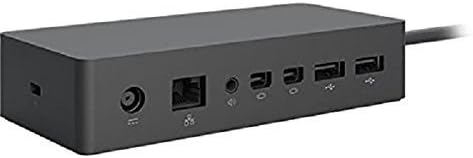
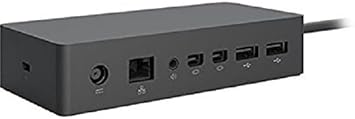
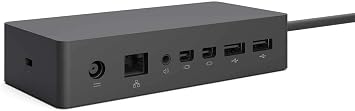
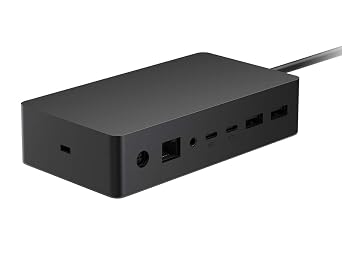
Microsoft Surface Dock (Pd9-00003),Black
vare #:
496095
NOK 2199
Price Details
Excluding Shipping & Custom charges ( Shipping and custom charges will be calculated on checkout )
*All items will import from US
På lager
 Importert fra USA-butikk
Bestill nå og få den rundt Onsdag, Juli 15
Sikker transaksjon
Ubuy arbeider hardt for å beskytte din sikkerhet og personvern. Vårt avanserte betalingssikkerhetssystem sikrer konfidensialitet ved å kryptere informasjonen din under overføring ved hjelp av AES (Advanced Encryption Standards) og SSL (Secure Socket Layer)-protokoller. Betalingsopplysningene dine er 100 % sikre da vi ikke deler betalingsopplysningene dine med tredjepartsselgere.
Våre beste leveringspartnere


Transform your surface into a desktop PC by plugging in your dock with the surface connect cable.

Fast
Shipping

Gratis
retur*

Sikret innpakking

100 % originale produkter

PCI DSS Compliance

ISO 27001 Certified


Note: Step Down Voltage Transformer required for using electronics products of US store (110-120). Recommended power converters Kjøp nå.


Hva skiller seg ut
Multiple Ports
Equipped with various ports, the Surface Dock allows seamless connectivity to multiple devices like monitors, keyboards, and external drives, enhancing productivity without cable clutter.
Fast Charging
The Surface Dock provides quick charging capabilities, ensuring your Surface device stays powered during intense work sessions, which is essential for professionals on the go.
Strømlinjeformet design
With its modern black finish and compact size, the Microsoft Surface Dock complements any workspace while ergonomically maintaining functionality, making it an attractive addition to your setup.
Produkt detaljer
- Compatibility: Surface go, surface laptop, surface laptop 2, surface pro, surface pro 3, surface pro 4,surface pro 6, surface book, surface book 2
- 2x Mini display ports, 1x Gigabit Ethernet port
- 4 USB 3.0 ports, 1x audio out port
- Magnetic surface connect cable. Transform your surface into a desktop PC by plugging in your dock with the surface connect cable. External power supply
- High speed data transferring
| Maskinvaregrensesnitt | Ethernet |
| Kompatible enheter | Microsoft Surface Pro 3 |
| Total Usb Ports | 4 |
| Number of Ports | 4 |
| Total Number of HDMI Ports | 2 |
| Smart Home Kompatibilitet | Not Smart Home Compatible |
| Vare dimensjoner L x B x H | 5.12"L x 1.18"W x 2.36"H (13 x 3 x 6 cm) |
| Vekt av varen | 2.64 Pounds (1.2 kg) |
| Farge | Svart |
| Merke | Microsoft |
| Global Trade Identifikasjonsnummer | 00885370996340 |
| UPC | 885370996340 |
| Produsent | Microsoft |
| Modellnummer | PD9-00003 |
| Mfr Delenummer | PD9-00003 |
| Enhetsantall | 1.0 Antall |
| Total USB Ports | 4 |
| Produktmål (L x B x H) | 5.12"L x 1.18"W x 2.36"H (13 x 3 x 6 cm) |
| Total HDMI Ports | 2 |
| Antall varer | 1 |
| Pakkevekt | 3 lbs |
Who Should Buy?

-
Fjernarbeidere
Ideal for remote workers needing multiple connections and quick access to peripherals for better productivity.
-
Studenter
Perfect for students using Surface devices for presentations and who need to connect to projectors and monitors.
-
Hjemmekontorer
Great for home office setups, allowing seamless switching between laptop and desktop peripherals for enhanced workflow.

-
Uformelle brukere
Not suitable for casual users who require basic functionality without the need for multiple display connections.
-
Reisende
Not ideal for frequent travelers due to its stationary design, making it less portable for on-the-go users.
-
Budsjettbevisst
May not be suitable for budget-conscious individuals as it can be considered expensive for basic docking needs.
PRODUKTBESKRIVELSE
Har du noen spørsmål? Chat med oss
Relaterte søk
Spørsmål og svar for kunde
-
spørsmål:
What are the main features of the Microsoft Surface Dock (Pd9-00003)?
svar: The Microsoft Surface Dock (Pd9-00003) features multiple ports including two Mini DisplayPort outputs, multiple USB 3.0 ports, and an Ethernet connection. This allows users to connect dual 4K monitors, charge your Surface device, and access high-speed internet all through a single dock. It enhances productivity, especially in multi-tasking environments. For instance, professionals working from home can seamlessly transition from a laptop setup to a desktop environment by simply connecting their Surface device to the dock. -
spørsmål:
Is the Microsoft Surface Dock compatible with all Surface devices?
svar: The Microsoft Surface Dock is designed specifically to work with Surface devices equipped with the Surface Connect port. This includes models like the Surface Pro 4, Surface Book, Surface Laptop, and newer models. Compatibility ensures that users can easily power their devices while connecting to peripherals. As an example, a Surface Pro user can enjoy a desktop experience by using the dock to connect external monitors and USB devices without any hassle. -
spørsmål:
How does the docking station improve productivity?
svar: By utilizing the Microsoft Surface Dock, users can significantly boost productivity by setting up a multi-monitor workstation, which allows for better organization of applications and windows. The dock supports dual 4K displays, enabling users to have expansive screen real estate for tasks like graphic design or programming. For instance, a graphic designer can keep design tools on one screen and previews on another, streamlining their workflow. -
spørsmål:
Can I charge my Surface device while using the dock?
svar: Yes, the Microsoft Surface Dock provides power to your Surface device while connected, ensuring that you can work uninterrupted. It eliminates the need for separate charging cables and also provides ample power to run connected peripherals. For example, using the dock during a video conference lets users stay fully powered while accessing cameras and microphones plugged into the dock. -
spørsmål:
What connectivity options does the Surface Dock support?
svar: The Surface Dock offers various connectivity options, including USB 3.0 ports for high-speed data transfer, a Gigabit Ethernet port for reliable internet access, and Mini DisplayPort outputs for connecting monitors. These diverse options make it suitable for different professional setups, allowing users to customize their workspace. A typical office scenario would involve connecting a printer and external drives through the USB ports while maintaining a stable internet connection. -
spørsmål:
What is the design of the Microsoft Surface Dock like?
svar: The Microsoft Surface Dock has a sleek, minimalistic design that complements Surface devices aesthetically. It is compact, allowing it to fit on most desks without taking up much space. This design not only enhances the visual appeal of a workspace but also promotes organized cable management. In a professional setting, this can lead to a cleaner and more efficient work environment. -
spørsmål:
How do I set up the Microsoft Surface Dock?
svar: Setting up the Microsoft Surface Dock is straightforward: simply plug the dock into a power outlet and connect your Surface device using the Surface Connect cable. From there, you can add peripherals like keyboards, mice, and monitors through the available ports. For users transitioning from a laptop to a desktop experience, this simplicity allows for quick adjustments without technical setup challenges. -
spørsmål:
Does the Surface Dock support audio output?
svar: Yes, the Microsoft Surface Dock supports audio output through connected displays or speakers. When attaching monitors equipped with built-in speakers, audio can be routed seamlessly, making it ideal for video conferencing or media playback. This feature enhances the overall experience for presentations or virtual meetings, as users can maintain sound quality without additional complications. -
spørsmål:
Are there any performance limitations when using the Surface Dock?
svar: While the Surface Dock is highly capable, performance can vary based on the connected Surface device and the number of peripherals used simultaneously. For instance, while running dual 4K monitors, heavy applications may cause strain on lower-end Surface models. Users should check individual specifications and optimize their setups accordingly to ensure the best experience. -
spørsmål:
Where can I buy the Microsoft Surface Dock (Pd9-00003)?
svar: You can purchase the Microsoft Surface Dock (Pd9-00003) from Ubuy in Norway. Ubuy offers a user-friendly shopping experience with a variety of options for quick and convenient purchasing tailored to customers in your region.
Microsoft Docking Stations Editorial Review
The Microsoft Surface Dock PD9-00003 allows users to connect their Surface Pro 3 or 4 tablets to multiple monitors and peripheral devices through the charging port. The dock also charges the tablet when in use and connects with 110-volt power. Users are able to run two 4K monitors at 30Hz, or one 4K monitor at 60Hz while connected to the dock and an additional monitor connected through the Surface Pro 4’s built-in charging port. The dock is not compatible with the Surface 2, but is compatible with the Surface Book and the Surface Go. Overall, customer reviews indicate that this product works well and is easy to set up, however, some have expressed disappointment with the lack of specific ports, such as a USB Type-C. **
Kundeanmeldelser og vurderinger
4461 kunders vurderinger
-
5 stjerne
76%
-
4 stjerne
11%
-
3 stjerne
5%
-
2 stjerne
2%
-
1 stjerne
6%
Vurder dette produktet
Del tankene dine med andre kunder
Fordeler
- Fungerer som annonsert
- Easy plug-and-play setup
- Charges the Surface Pro while in use
- Eliminates wire clutter
- Compatible with the Surface Pro 3, 4, Book, and Go
Ulemper
- Limited to 30Hz when running two 4K monitors
Platform Trust & Buyer Confidence

MT
Mohd
Verified buyer
“The product received very good packaging & safe…Thank You”
16 June 2026 · via Trustpilot
SJ
Shawati
Verified buyer
“Accurate delivery timing given”
16 June 2026 · via Trustpilot
YB
Youcef
Verified buyer
“Not madly expensive like I thought, and much quicker than promised.”
15 June 2026 · via Trustpilot
LM
Leila
Verified buyer
“Never dealt with Ubuy before, but everything worked out great. Seamless cross border purchasing and shipping. Thanks!”
6/7/2026 · via Trustpilot
KA
Kwame
Verified buyer
“The process was smooth, with clear communication and timelines. This was my 1st purchase and I am really impressed. I will definitely be coming back.”
12 June 2026 · via Trustpilot
Sikker utsjekk
Global Delivery
Enkel retur
Genuine Products
Top selling Surface Dock in Norway


Last Updated on July 7, 2026
Produktets prishistorikk
Viktig informasjon
- Begrensninger: For produkter som fraktes internasjonalt, vennligst merk at eventuell produsentgaranti kanskje ikke er gjeldende; produsentens tjenestealternativer er kanskje ikke tilgjengelige; produktveiledninger, instrukser og sikkerhetsadvarsler er kanskje ikke tilgjengelig på destinasjonslandets språk; produktene (og medfølgende materiell) er kanskje ikke laget i samsvar med destinasjonslandets standarder, spesifikasjoner og krav om merking; og det kan være at produktene ikke har samme spenningsgrad og elektriske standard som destinasjonslandet eller ikke følger (det må brukes adapter eller strømomformer der dette gjelder). Mottakeren er ansvarlig for å forsikre seg om at produktet lovlig kan importeres til destinasjonslandet. Ved bestilling fra Ubuy eller deres partnere er mottakeren den registrerte importøren, og må etterleve alle lover og reguleringer i destinasjonslandet.
- Ikke alle produktene som er opplistet hos Ubuy er til salgs, siden Ubuy er en global søkemotor. Produkter er underlagt reguleringer for eksport og handel.
NOK 2199
Bestill nå og få den rundt Onsdag, Juli 15
This item is not restrict in my country.(Please click on above link if this item is not restrict in your country, So our team will review and allow.)
QTY:
Sikker transaksjon
PCI DSS compliant and ISO 27001:2022 certified, with encrypted payments and full buyer protection on every order.
Våre beste leveringspartnere
Rask levering over grenser
Funksjoner og fordeler
- Connectivity with 4 USB 3.0 ports, 2x Mini display ports, 1x Gigabit Ethernet port, and 1x audio out port.
- Compatible with a range of Microsoft Surface devices.
- External power supply.
- High speed data transferring.
- Magnetic surface connect cable.
- Transforms your Surface device into a desktop PC.
Ubuy Assurance
Experience worry-free shopping with 100% original products, PCI DSS-compliant payment security, ISO 27001-certified data protection, the fastest cross-border delivery, free returns *, and secure packaging on every order.