- Home Page /
- Office Products /
- Office Electronics /
- Printers & Accessories /
- Printer Parts & Accessories /
- Printer Ink & Toner /
- Inkjet Ink Cartridges /
- Epson F170 Sublimation Printer Bundle with Cr...
0 ratings


Item #:
220374659
Epson F170 Sublimation Printer Bundle with Craft Express Combo Heat Press & Baseball Cap Attachment
77% of respondents would recommend this to a friend
Item #:
220374659
NOK 11587
Price Details
Excluding Shipping & Custom charges ( Shipping and custom charges will be calculated on checkout )
*All items will import from US
5%
In stock
 Imported from USA store
QTY:
Order now and get it around Wednesday, June 24
Secured transaction
Ubuy works hard to protect your security and privacy. Our advanced payment security system ensures confidentiality by encrypting your information during transmission using AES (Advanced Encryption Standards) and SSL (Secure Socket Layer) protocols. Your payment details are 100% secure as we do not share your payment details with third party sellers.
Our Top Logistics Partners


Get fast, reliable dye-sub printing right out of the box with the SureColor F170.

Fast
Shipping

Free
Return*

Secure Packaging

100% Original Products

PCI DSS Compliance

ISO 27001 Certified


Note: Step Down Voltage Transformer required for using electronics products of US store (110-120). Recommended power converters Buy Now.


What Stands Out
Complete Bundle
The Epson F170 and Craft Express combo provide a comprehensive solution for sublimation printing and heat transfer, enabling users to create high-quality custom designs for various products effortlessly.
Versatile Applications
This combo package allows users to produce a wide range of items, including mugs, t-shirts, and more, making it ideal for small businesses and crafters seeking to diversify their offerings.
User-Friendly
Designed for ease of use, both the printer and heat press systems come with intuitive controls and clear instructions, ensuring that even beginners can achieve professional results without hassle.
Product Details
- 𝗘𝗽𝘀𝗼𝗻 𝗦𝘂𝗯𝗹𝗶𝗺𝗮𝘁𝗶𝗼𝗻 𝗣𝗿𝗶𝗻𝘁𝗲𝗿: The Epson F170 is a powerful, dye sublimation printer designed for precise and vibrant sublimation printing. Equipped with Epson’s innovative PrecisionCore technology, this printer delivers sharp, high-resolution prints on a variety of sublimation-ready materials. Its user-friendly interface and easy setup make it perfect for beginners and pros alike.
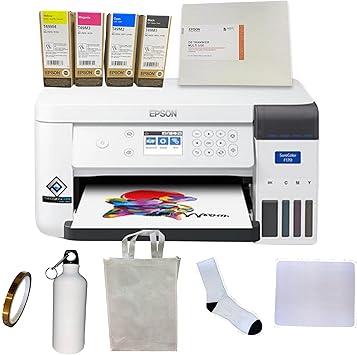
- 𝗔𝘀𝘁𝗼𝘂𝗻𝗱𝗶𝗻𝗴 𝗣𝗿𝗶𝗻𝘁 𝗤𝘂𝗮𝗹𝗶𝘁𝘆: Epson's Surecolor F170 Sublimation printer boasts the PrecisionCore printhead which offers Precision Droplet Control for the most outstanding image clarity on the market. Included in the printer bundle: full set of Epson sublimation ink, user guide, and AC power cable.
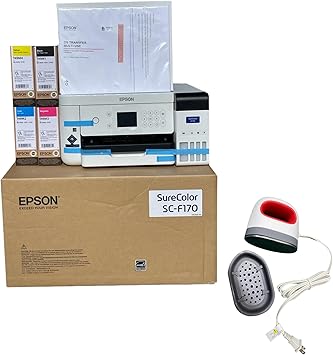
- 𝗖𝗿𝗮𝗳𝘁 𝗘𝘅𝗽𝗿𝗲𝘀𝘀 𝗖𝗼𝗺𝗯𝗼 𝗛𝗲𝗮𝘁 𝗣𝗿𝗲𝘀𝘀: Achieve professional-quality transfers with the Craft Express 9” x 12” Heat Press. Whether you're pressing t-shirts, bags, or other sublimation blanks, this heat press ensures even heat and flawless results. Attachments available to allow pressing of non-flat items such as caps, flasks, tumblers, and plates.
- 𝗖𝗮𝗽 𝗛𝗲𝗮𝘁𝗲𝗿 𝗔𝘁𝘁𝗮𝗰𝗵𝗺𝗲𝗻𝘁: Perfect for sublimation and applying patches to hats and hat bills. Designed for convenience and efficiency, the Cap Heater Attachment is the perfect addition to your Craft Express Flat Heat Press, allowing you to create high-quality, customized hats with ease. Make cap and hat pressing possible with this heat press attachment tool!
- This Epson & Craft Express combo is the ultimate solution for anyone looking to start or grow their sublimation business. With everything you need in one package, you can create a wide range of personalized products with ease and precision. Whether you're just starting or looking to expand your creative toolkit, this combo offers unbeatable value and performance!
| Printer Type | Dye Sublimation |
| Other Special Features of the Product | Network-Ready |
| Printer Output Type | Color |
| Item Dimensions D x W x H | 13.7"D x 14.8"W x 7.4"H (34.8 x 37.6 x 18.8 cm) |
| Print media | Fabric |
| Compatible Devices | PC |
| Ink Color | black, cyan, magenta, yellow |
| Additional Printer Functions | Print Only |
| Control Method | Touch |
| Number of Trays | 1 |
| Processor Count | 1 |
| Number of Drivers | 3 |
| Resolution | 1200 x 600 |
| Display Type | LCD |
| Maximum Media Size | 8.5 inches x 47.2 inches (21.6 cm) |
| Maximum Sheet Capacity | 150 |
| Paper Size | 14.8 inches (37.6 cm) |
| Maximum print Resolution Color | 1200 x 600 dpi |
| Maximum Print Resolution Black and White | 1200 x 600 dpi |
| Dual-sided printing | No |
| Duplex | Simplex |
| Maximum Copy Resolution Color | 1200 x 600 dpi |
| Maximum Copy Resolution Black and White | 1200 x 600 dpi |
| Brand | Johnson Plastics Plus |
| Model Name | Epson & Craft Express Cap-Press Bundle |
| Model Number | 810174421002 |
| Built-In Media | Epson F170 Sublimation Printer, Epson Sublimation Ink, User Guide, AC Power Cable, Craft Express 9” x 12” Heat Press, Cap Heater Attachment |
| Model Series | SureColor |
| Specific Uses For Product | Sublimation |
| UPC | 810174421002 |
| Manufacturer | Epson & Craft Express |
| Color Pages per Minute | 1 ppm |
| B&W Pages per Minute | 1 ppm |
| Initial Page Print Time | 1 minute or less |
| Color | White & Blue |
| Color Depth | 24 bpp |
| Printer Connectivity Type | Wireless, USB, Ethernet |
| Hardware Interface | USB |
| Number of Ethernet Ports | 1 |
| Total Usb Ports | 1 |
| Connectivity Technology | Wireless, USB, Ethernet |
| Printing Technology | Dye Sublimation |
| Special Feature | Network-Ready |
| Printer Output | Color |
| Maximum Print Speed (Color) | 1 ppm |
| Max Printspeed Monochrome | 1 ppm |
| Product Dimensions (L x W x H) | 13.7"D x 14.8"W x 7.4"H (34.8 x 37.6 x 18.8 cm) |
What's in the box
Epson F170 Sublimation Printer, Epson Sublimation Ink, User Guide, AC Power Cable, Craft Express 9” x 12” Heat Press, Cap Heater Attachment
Who Should Buy?

-
Small Business Owners
Ideal for entrepreneurs who want to create custom merchandise efficiently using sublimation printing and heat pressing.
-
Craft Enthusiasts
Perfect for hobbyists looking to explore sublimation projects, including apparel and mugs, with professional-grade equipment.
-
Event Planners
Great for those organizing events and requiring customized items such as banners, mugs, and personalized gifts.

-
Budget-Conscious Users
May not be the best choice for those with limited budgets, as initial investment can be significant.
-
Casual Users
Not suitable for individuals seeking a simple, low-maintenance solution, as sublimation requires specific materials and setup.
-
Non-creative Professionals
Not ideal for users who don't need custom printing solutions, as the product caters primarily to creative applications.
Product Description
Have any Query? Chat with us
Customer Questions & Answers
-
Question:
What is the Epson SureColor F170 Dye-Sublimation Printer best used for?
Answer: The Epson SureColor F170 Dye-Sublimation Printer is designed for high-quality printing of vibrant images on various substrates such as fabrics, ceramics, and metal. This printer is perfect for small businesses and hobbyists who wish to produce custom t-shirts, mugs, and accessories. The die-sublimation process allows for full-color prints that are durable and resist fading, making it an excellent choice for merchandise that requires longevity. -
Question:
What materials can I print on using the Epson SureColor F170?
Answer: You can print on a wide range of materials suitable for dye-sublimation, including polyester fabrics, coated ceramics, and metals. This flexibility makes the printer ideal for personalized items like apparel, promotional products, and home décor. To achieve the best results, ensure that the materials you use are specifically designed for dye-sublimation printing. -
Question:
How does the dye-sublimation process work with the Epson F170?
Answer: The dye-sublimation process works by first printing your design onto a special transfer paper using the sublimation ink provided with the Epson F170. When heat is applied, the solid dye transforms into gas and penetrates the fibers of the substrate, creating a permanent bond. This results in vibrant colors and durable prints that won't wash away. It's ideal for creating high-quality, long-lasting products. -
Question:
Can I use third-party inks with the Epson SureColor F170?
Answer: While it is technically possible to use third-party inks, it is highly recommended to use Epson's branded inks for the F170 to ensure the best print quality and machine performance. Third-party inks may not provide the same level of vibrancy and could potentially damage the printer. Utilizing Epson ink helps maintain color accuracy and reliability, allowing for consistent results on every print. -
Question:
What type of maintenance does the Epson SureColor F170 require?
Answer: Regular maintenance for the Epson SureColor F170 includes cleaning the print heads and ensuring that the ink system is functioning properly. Regularly check for any clogs or issues, and run maintenance cycles as recommended in the user guide. Keeping the printer in a dust-free environment also contributes to long-term reliability. Maintaining your printer will ensure that you consistently achieve high-quality prints. -
Question:
What kind of software is needed for the Epson SureColor F170?
Answer: The Epson SureColor F170 is compatible with various design software applications. Popular choices include Adobe Photoshop, CorelDRAW, and print management software like Sawgrass. These tools allow you to create and prepare images for dye-sublimation while adjusting color profiles and print settings. Using suitable software enhances your design process and provides optimal print outcomes. -
Question:
Is there a specific type of transfer paper I need for the Epson F170?
Answer: Yes, it’s essential to use dye-sublimation transfer paper specially designed for sublimation printers like the Epson F170. This paper allows for the optimal transfer of ink onto your substrates. The right transfer paper ensures that the ink adheres properly during the heat press process, leading to vibrant colors and sharp images on the final product. -
Question:
Can the Epson SureColor F170 print on A4 size paper?
Answer: The Epson SureColor F170 is specifically designed for 8.5 x 11-inch transfers and is best optimized for that paper size. However, you can use A4-size paper (8.3 x 11.7 inches) if you adjust your print settings correctly. Just ensure that your designs fit within the printable area to ensure quality and prevent any cut-off during printing. -
Question:
How long does a typical print take with the Epson F170?
Answer: The print time with the Epson SureColor F170 may vary depending on the complexity of the image and the print settings used. Generally, a standard print job can take anywhere from 2 to 5 minutes. The printer’s high speed ensures you can quickly produce several prints in a short period, making it ideal for fulfilling larger orders or creating multiple products. -
Question:
Where can I buy the Epson SureColor F170 Dye-Sublimation Printer?
Answer: You can purchase the Epson SureColor F170 Dye-Sublimation Printer from Ubuy in Norway. Ubuy offers the printer along with a full set of ink, a user guide, an AC power cable, a sublimation starter kit, thermal tape, and maintains a solid reputation for customer service and convenience.
JohnsonPlasticsPlus Inkjet Ink Cartridges 810174421002 Editorial Review
The Epson SureColor F170 Dye-Sublimation Printer has garnered a mix of feedback from users, primarily highlighting its performance, ease of setup, and print quality, while also indicating some concerns regarding connectivity and speed. Many customers have found this printer to be an excellent addition to their creative setups, especially for those utilizing Cricut machines. Users frequently praise the vibrant and bold colors produced, as well as the printer's ability to handle sublimation printing with remarkable precision. Setup is Consistently described as straightforward, with multiple users emphasizing the user-friendly installation process, from downloading drivers to connecting wirelessly. This ease of use is particularly beneficial for those who may not be highly tech-savvy. Additionally, the inclusion of a sublimation starter kit has been deemed valuable, giving users the necessary materials to begin their projects without extra cost. However, not all experiences have been positive. Some customers encountered frustrations with network connectivity, indicating that the printer sometimes struggles to maintain a stable connection. This can lead to interruptions in workflow, which is a significant drawback for those needing reliability during their creative processes. While most users find the print speed acceptable for smaller projects, there are notes that it could be improved, especially for larger jobs. Overall, the Epson SureColor F170 appears to be a solid option for individuals looking to delve into sublimation printing, offering quality outputs and ease of use, but potential buyers should be aware of possible connectivity issues that could affect their experience. **
Customer Reviews & Ratings
9 customers ratings
-
5 Star
57%
-
4 Star
21%
-
3 Star
0%
-
2 Star
0%
-
1 Star
22%
Review this product
Share your thoughts with other customers
Pros
- Excellent print quality with vibrant colors
- Easy setup and installation process
- Ideal for use with Cricut systems and other projects
- Comes with a sublimation starter kit for immediate use
- Functional for smaller projects
Cons
- Paper tray capacity is limited
Top selling Epson F170 printer in Norway






Last Updated on June 16, 2026
Product Price History
Important information
- Limitations : For products shipped internationally, please note that any manufacturer warranty may not be valid; manufacturer service options may not be available; product manuals, instructions, and safety warnings may not be in destination country languages; the products (and accompanying materials) may not be designed in accordance with destination country standards, specifications, and labeling requirements; and the products may not conform to destination country voltage and other electrical standards (requiring use of an adapter or converter if appropriate). The recipient is responsible for assuring that the product can be lawfully imported to the destination country. When ordering from Ubuy or its affiliates, the recipient is the importer of record and must comply with all laws and regulations of the destination country.
- Not all the products listed on Ubuy are for sale, as Ubuy is a global search engine. Products are subject to export/trade regulations.
NOK 11587
Order now and get it around Wednesday, June 24
This item is not restrict in my country.(Please click on above link if this item is not restrict in your country, So our team will review and allow.)
QTY:
Secured transaction
Ubuy works hard to protect your security and privacy. Our advanced payment security system ensures confidentiality by encrypting your information during transmission using AES (Advanced Encryption Standards) and SSL (Secure Socket Layer) protocols. Your payment details are 100% secure as we do not share your payment details with third party sellers.
Our Top Logistics Partners
Fastest cross-border delivery
Features & Benefits
- Fast and reliable dye-sublimation printing from Epson.
- Ideal for personalizing various items like mugs, shirts, and gifts.
- Professional-quality prints using PrecisionCore technology.
- User-friendly setup ideal for both beginners and pros.
- High-capacity ink bottles reduce need for frequent replacements.
- Comprehensive solution for high-quality, small-scale production.